


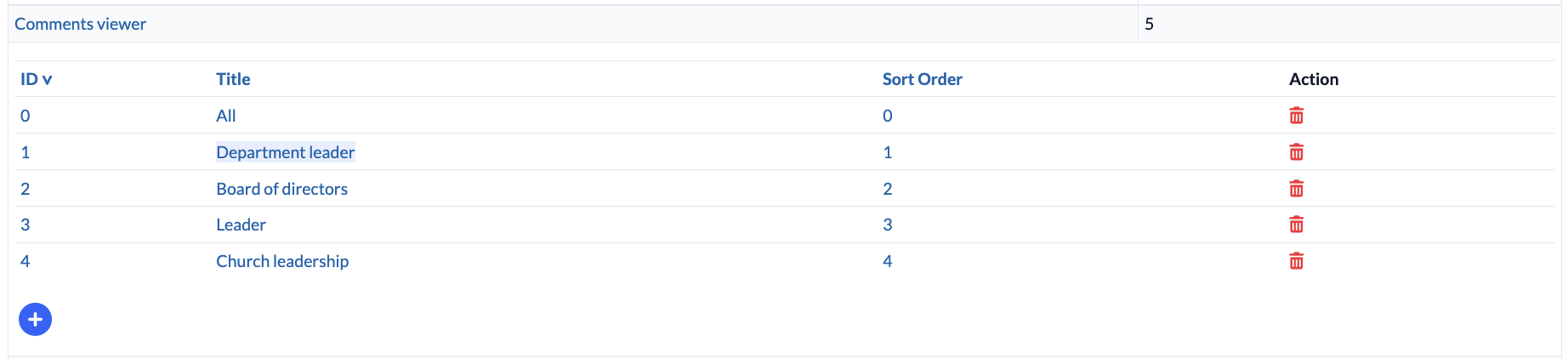
The “Persons” module allows you to set comments at different permission levels. These permission levels can be customized under People > Master Data > Comments Viewer. There are three default levels:
- All
- Department leader
- Board of Directors
Adding permission levels #
You can set up new levels by clicking the plus sign. Recommendation: Don’t set up too many levels, as this will make administration and permission management very time-consuming later on.
Permission for the comments #
Um nun z. B. einer Person die Berechtigung zu geben, Kommentare für den Vorstand zu sehen, muss in der Rechteverwaltung > Personen > Kommentare von Personen sehen dieser Person direkt das Recht der Stufe “Vorstand” zugeordnet werden.
It definitely makes more sense to assign comment permissions for specific levels at the group level. For example, the “Board of directors” group should be assigned the permissions for the “Board of directors” level.
For example, the ” All ” person status can be assigned to everyone via the “Member” person status, so that every member can see these comments.