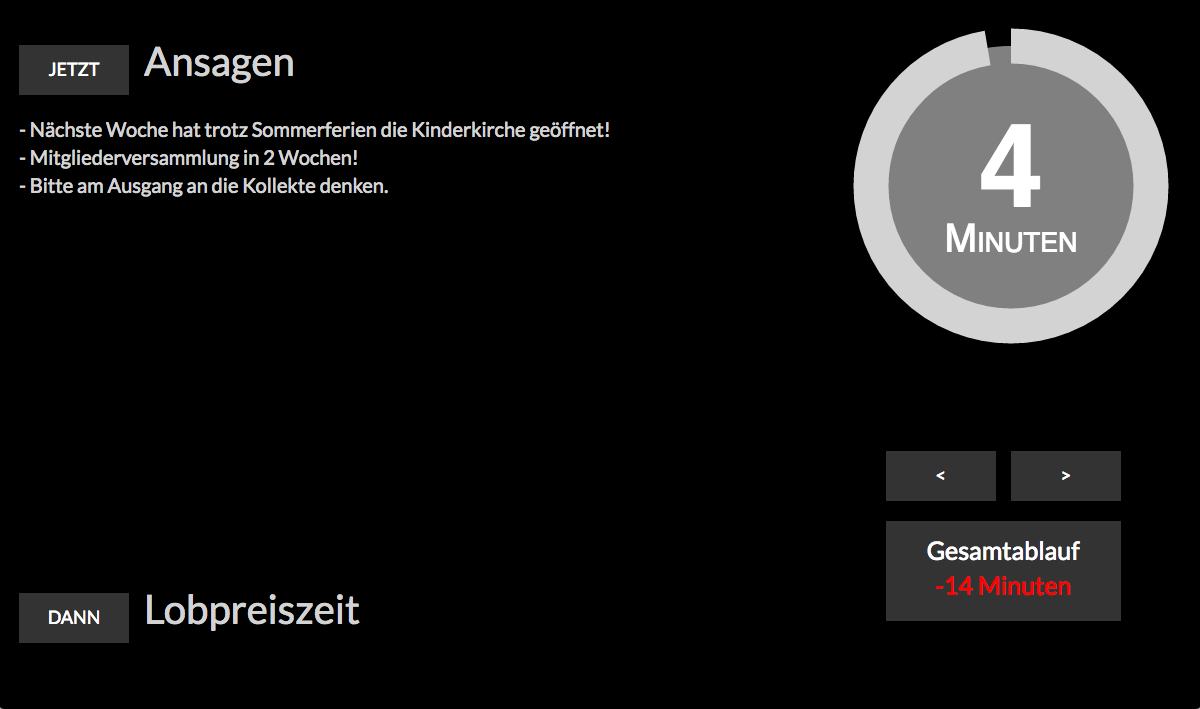


With the Live Agenda, you can follow the service schedule closely and see how long the current post is supposed to last, as well as whether there is any delay or Before, and if so, how much. The scheduled times are automatically loaded from the respective Agenda.
View the Live Agenda #
Once an Agenda has been completed, you can view the Live Agenda.
You can view the Live Agenda either directly from the agenda or by clicking the clock icon in the service schedule—this icon appears next to an event as soon as it takes place today and an agenda has been saved for it.
Controlling the Live Agenda #
You can use “Roles” to specify who is allowed to control the Live Agenda. To do this , edit the corresponding role in the master data and check the “Allowed to control the Live Agenda” checkbox.
A person assigned to this authorized role will see the Live Agenda navigation elements as soon as the Agenda is completed and can use them to control the Live Agenda.

To the right of the countdown, there are forward and backward arrows that you can use to mark the items on the Agenda as completed once they’re actually finished.
ChurchTools always automatically calculates the current delay. If an item was switched over too late, the difference is displayed in red in minutes. If it was switched over earlier than planned, the system shows how far ahead of the Agenda you are.