


With this feature, you can automatically manage the group memberships of people in your congregation, leaving you more time to take care of people instead of managing their memberships.
It saves the church office time when managing groups and the people in your church will be pleased that they are added to groups more quickly thanks to this feature. Processes can be automated, your groups are kept up to date without manual effort and you can always react and act on a good basis.
How does “Automatic membership” work? #
In the settings of a group, you set IF conditions in a person filter and then define which actions should THEN be executed for the persons found in this way.
IF personal filters take effect… #
To do this, you first use a person filter to select the people in your congregation with the person or group properties you want to have automatic actions performed in the selected group.

All person information (e.g. person status or gender) and essential information on membership in other groups (e.g. Role or Joined since) are available for filtering. If you use a date, both relative and formula-based filters are available.
You can combine the conditions for the filter in “and” or “or” connections (e.g. conjunction or disjunction) as appropriate for your use case.
Below the person filter, you will always be shown a current hit list, which you can use to easily check whether your filter is set correctly.
… THEN actions are executed automatically #
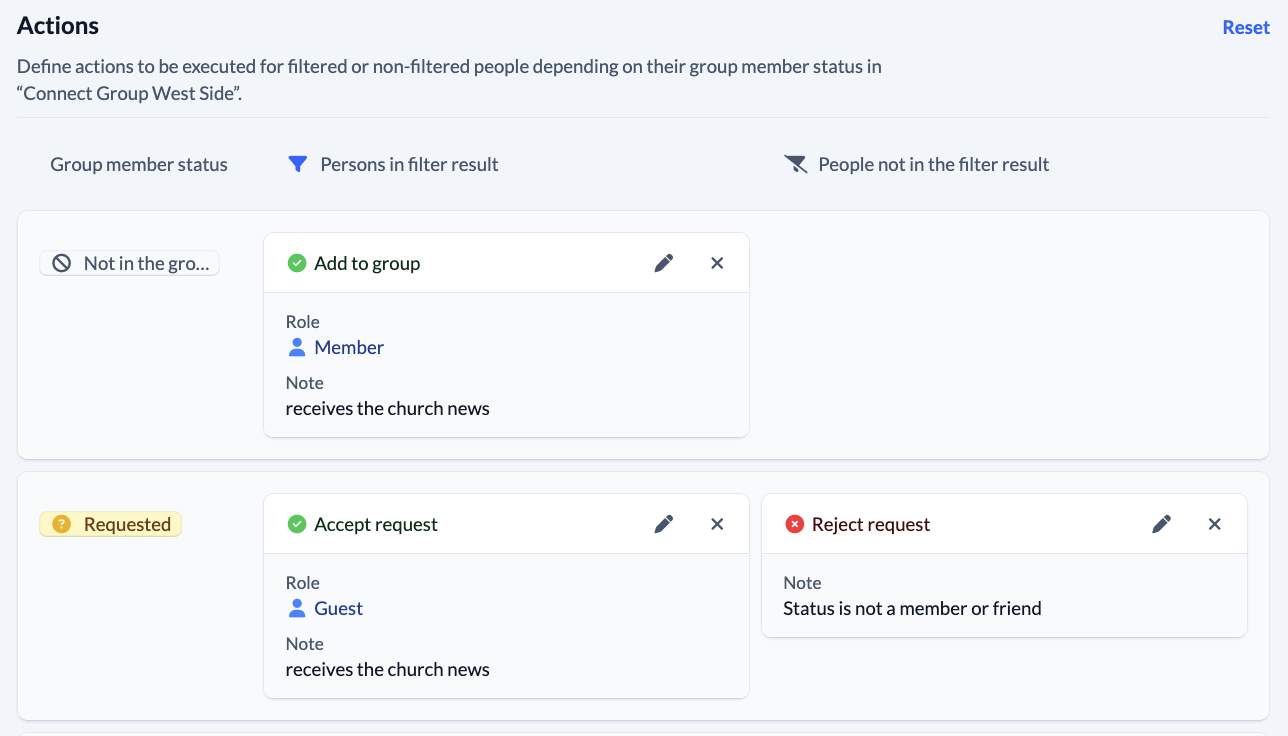
The persons found with the filter you have set will then be automatically assigned with the execution of ...
- … added to or removed from the group you selected.
- … receive a new group member role and/or a new group membership status.
- … have new or changed group membership fields entered.
A distinction is made between two columns. In the left-hand column, you define actions for the people who match your filter result and in the right-hand column for the people who do NOT match your filter result.
Versions individually adjustable #
You determine whether the previously set actions
- once manually or
- are to be executed automatically on a regular basis. (1x per day between 0 and 4 o’clock)

Who can use “Automatic membership”? #
Users who have the “administer persons” right can use this feature for their groups. As this new feature is very broad and potentially serious mistakes can be made (e.g. removing all members of a group), it makes sense to enable this function for admins only. At the same time, this means that only admins can implement the major benefits of this feature for your church.