


A person can be assigned the visibility status “visible” or “hidden.” This means the person is neither deleted nor archived and remains stored in the system. However, the person is hidden from lists of people, selections, and people searches.
This also applies to the selection of individuals in other areas, such as when individuals are selected for roles, groups, or similar roles. Any existing links to the individual are retained.
For example, you can specifically exclude a person whose data requires special protection from the normal workflow and from general selection lists without deleting the data record.
Who can hide people and see hidden people? #
There are two separate global permissions in the “People” section:
- Edit person visibility (hide, show) (edit person visibility):
This allows you to toggle a person’s visibility between “visible” and “hidden” when creating the record or at a later time. - View hidden persons: This ensures that hidden persons continue to appear in lists, search results, and selections.
These permissions are independent of one another. If you are allowed to hide a person, you may subsequently be unable to view or edit that person yourself without the second permission. A note will be displayed to you when you hide the person.
How do I hide people and make them visible again? #
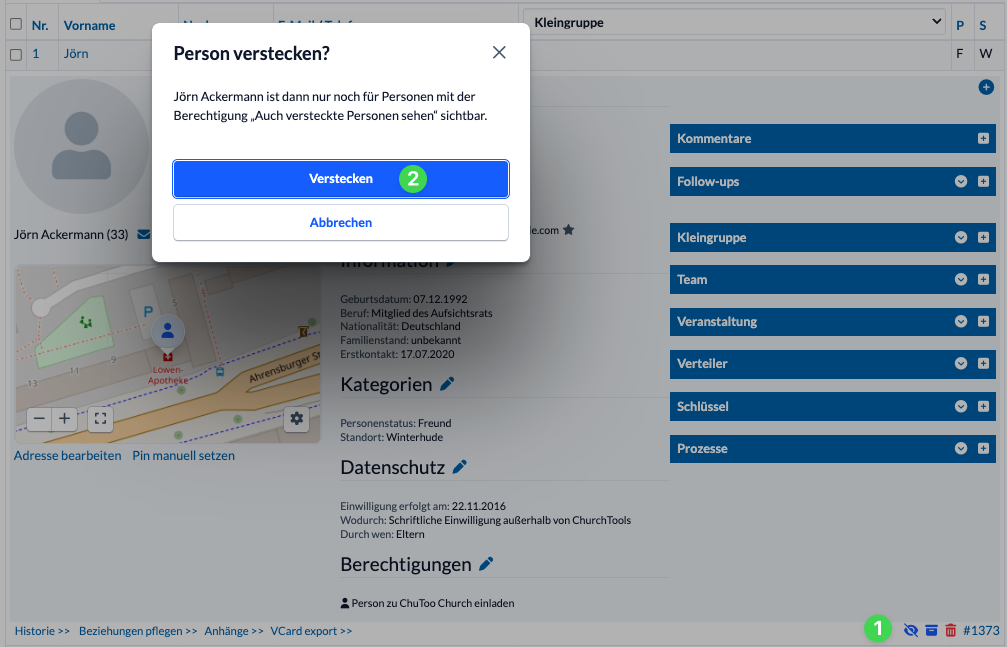
To do this, open the person’s profile in the People module and hide (2) it using the eye icon(1) at the bottom of the person’s detail view. You can make it visible again from the same location.
The app doesn’t let you hide people, but of course they won’t be displayed there either if the user doesn’t have the appropriate permission.
What do users without this permission see? #
To them, the hidden person essentially appears as if they do not exist:
- It does not appear in lists of people.
- She is not included in person selections or search results.
- Even direct queries for this person do not return standard personal data.
- Administrator permissions alone are not automatically sufficient to view hidden users.
Special Case: Oneself #
A user’s own profile remains visible to that user at all times, even if it is marked as hidden.