


In this article, we’ll show you how to record attendance for a meeting in the Check-in module.
1. Open the meeting and the groups #
First, select the date of the group meeting under “Meetings ” (1). Click the gear icon (2) to select a calendar and view future events from it.
Then select the group (4) for which you want to record attendance. Use the gear icon (5) to select a supergroup to narrow down the list of groups.
2. Set View Options #
In the right-hand column, under ” People (6),” you will now see a list of all the people who are members of the previously selected group.
Use the gear icon under “People ” (7) to choose whether to sort the displayed people by first name or last name, and to filter group members by their Role.
When you click the “Hide Present People” toggle (8), the list will show only those people whose attendance has not yet been recorded.
In the column view options (9), you can choose between the default view with all columns, the simplified view without the appointment column, or the people view. For more information, see our article “What views are available in Check-in, and what can I use them for?”

3. Track Attendance #
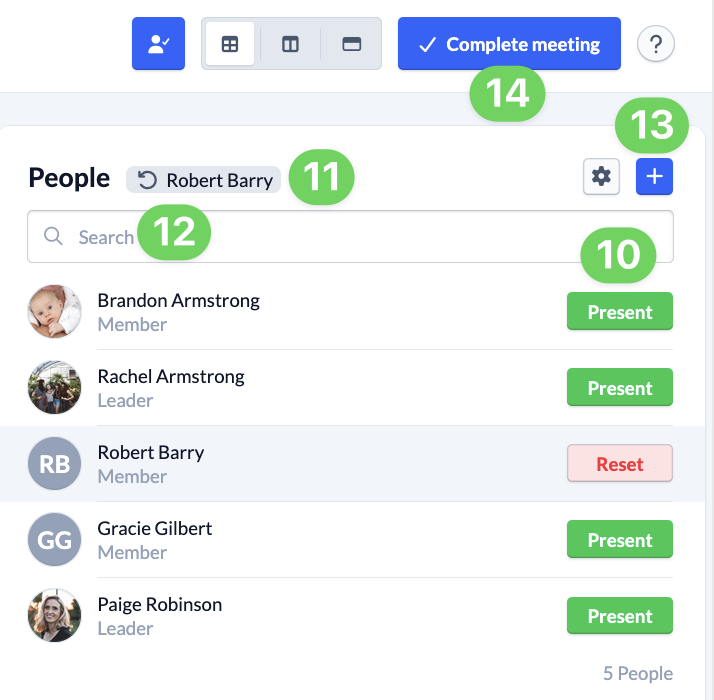
Using the “Present ” button (10), you can now mark the people who show up for the group meeting as present.
You can also reset the attendance status in the same place.
You’ll always see the most recently marked person at the top of the column behind the “People” column header as a button with a circular arrow (11). If you accidentally marked the person as present, you can reset their presence directly above it.
If you can’t find someone on the list, you can search for them (12). This helps you navigate large group lists quickly.
4. Complete the meeting #
Once you’ve recorded the attendance of all participants, you can wrap up the group meeting by clicking ” Complete Meeting ” (14). To find out why this is a good idea, read the article “Why Is It Worth Completing a Group Meeting?”
Track Attendance in the App #
It works exactly the same way in the app. Here, you can schedule a meeting through your groups and then access the attendance tracking feature.
We explain exactly how to do this in the article ” How do I record attendance in the app?”