


The Check-in module helps you quickly and easily keep track of attendance, even in challenging situations. You decide which of the view options best suits your needs:
- You can choose which of the three columns— meetings, groups, and people —to display.
- You decide whether or not to display people who are already marked as present in the list.
Both view options are available at any time with a single click at the top of the page.
Customize Column Display #
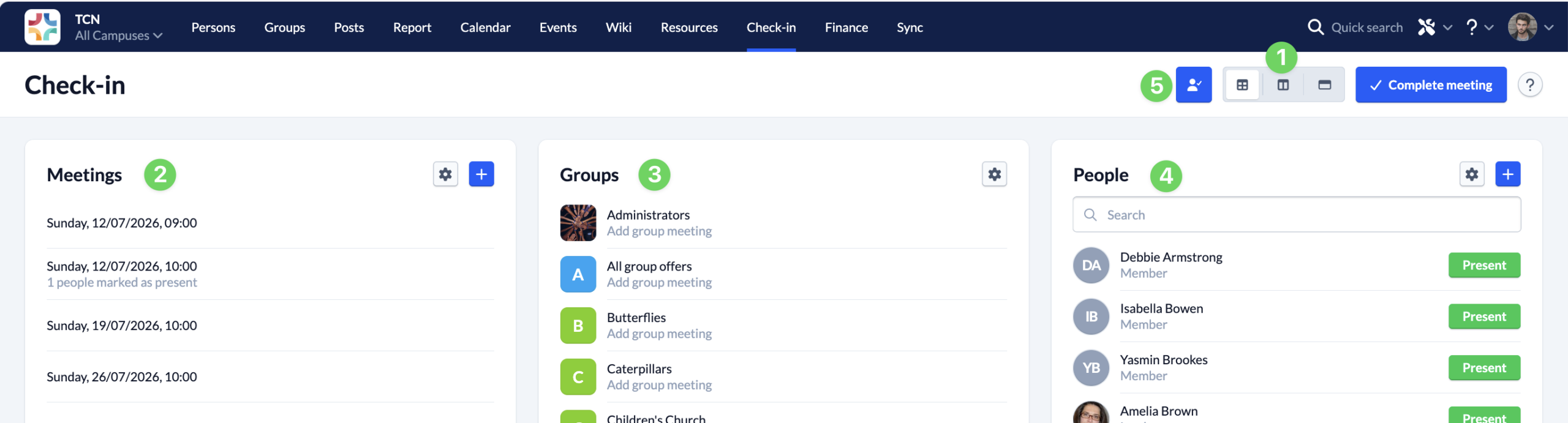
Using the three icons for the Standard View, Simplified View, and People View (1), you can display exactly the columns that are important to your current situation. The columns available are Meetings (2), Groups (3), and People (4).
- Standard View – shows you all three columns. This gives you a complete overview of all events for all groups, and you can switch between different calendar events or group meetings at any time. This is especially helpful when following up on multiple events or recording attendance.
- Simplified View – shows you only the “Groups ” and “People” columns, so you can manage attendance for a single event across multiple groups at the same time. This helps you keep track of things even when recording attendance for multiple groups is complex.
- People View – shows you only the “People” column so you can focus entirely on attendance at the selected group meeting – the ideal overview for a specific event of a single group, such as a choir rehearsal or a leadership meeting.
Customize the list of people #
If you click the “Show Attendees” button (5), all attendees who have already checked in will remain visible. This allows you to choose whether you want to see everyone or only those who have not been marked as present yet.