


Sometimes, planned budgets are not fully utilized or, for other reasons, need to be allocated to other areas of your church. In ChurchTools, you have the option to transfer budgets from one cost center to another.
To do this, use a transfer account—for example, account 1380 “Cost Center Reconciliation Account” from SKR03 or account 1498 “Cost Center Reconciliation Account” from SKR04—to make it clear that no actual cash flow is taking place here.
In our example, the children’s division determines that it does not need €500 of its budget. This money is to be made available to the youth division instead.
In the booking, enter the same account as both the account and the contra account (1). A second cost center field will then appear, so that you now see a “Cost Center: Expenses”field (2) and a “Cost Center: Revenue” field ( 2). Here, enter the two cost centers between which you want to transfer the budget.
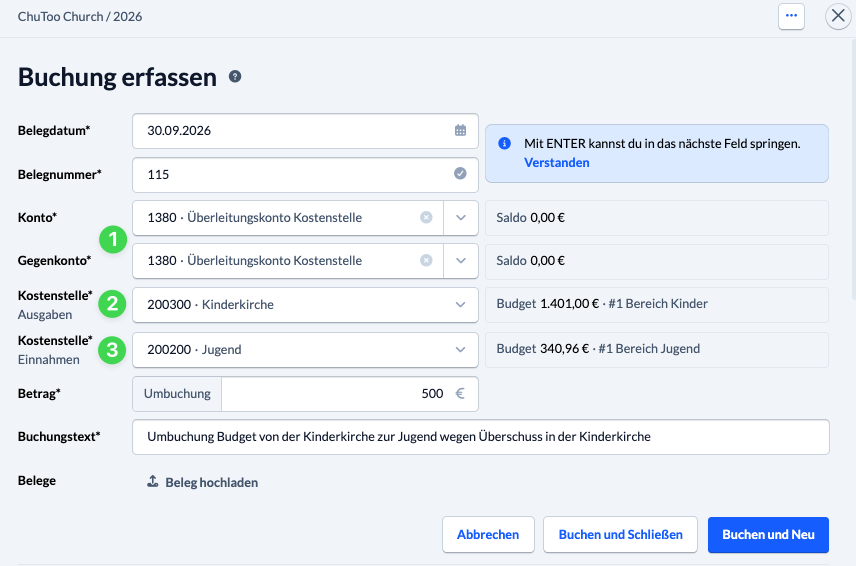
If you use the clearing account as both a debit and credit account, its balance remains unchanged; only the amount is transferred from the expense center to the revenue center, where it is added to the budget.

In the posting overview, such a booking is marked as a cost center transfer.
