Resource #
A resource is an item or space that can be rented or used. For example, this could be the community hall, the café, the projector, or the presentation board.
Automatic confirmation: This can be configured in the module’s master data.
- If not enabled: The resource is not automatically confirmed. An administrator must confirm the resource request (useful for room reservations, etc.). When a request is made, e-mails are automatically sent to the administrator and the requester.
- If enabled: The resource is automatically confirmed. Each requester is responsible for ensuring that the resource is not already reserved (e.g., for a projector). The requester receives confirmation of the booking via e-mail, and the administrator is notified that the resource has been reserved.
Multiple Bookings: You can configure whether a resource can be used for multiple transactions in the master data.
- Multiple bookings are intended, for example, for performing microphones—of which there are several available, but which are listed as a single resource. Or for requests from staff members in larger congregations or conferences who aren’t exactly sure what resources are available on-site. For example, an office assistant can then take over the specific planning. The staff member who made the request will then automatically receive an e-mail regarding the specific resource.
It makes sense to create resources here that are general in nature and will later be planned in detail by someone in the office. For example, a resource such as “Room 10…50 people,” “Room 51…100 people,” or “Projector.” - Multiple bookings therefore do not cause a conflict. There is a separate permission required to request multiple bookings.
Resource Type #
Resources can be categorized by type to provide a better overview. For Admins: The sort key allows you to sort the entries; entries with lower numbers appear first.
Status #
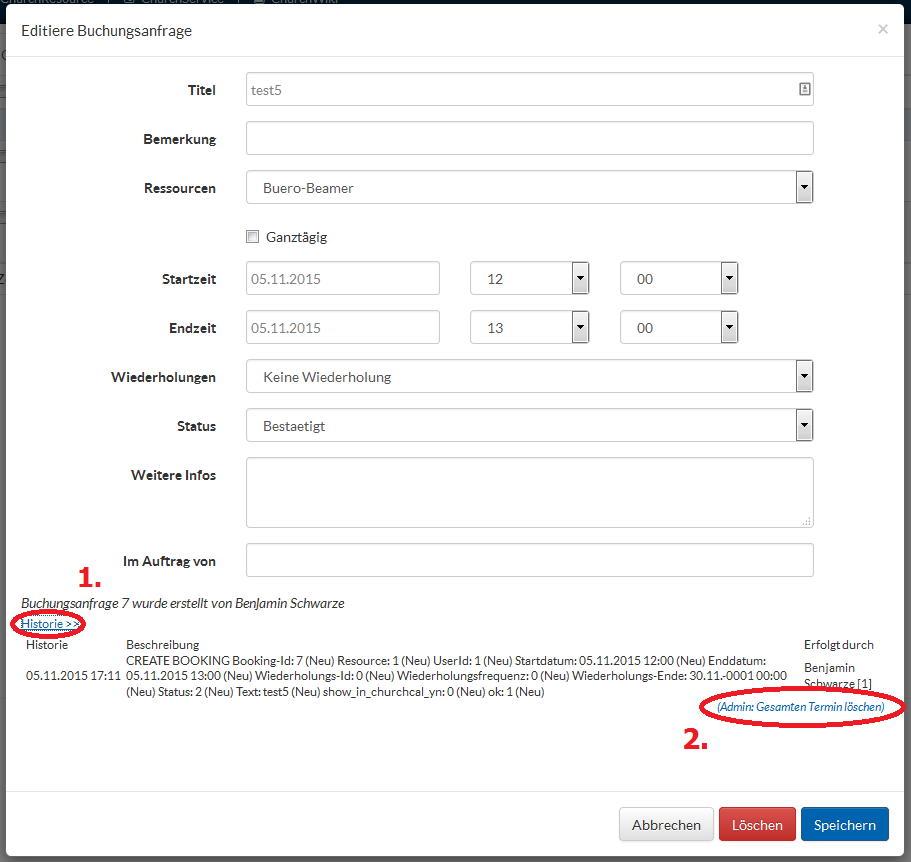
A booking request for a resource can go through various statuses. For a standard resource that does not receive automatic confirmation, the booking is assigned the status “Awaiting Confirmation.” Once it is confirmed by the administrator, it is marked as “Confirmed,” or “Rejected” if it is not approved.
If a booking needs to be deleted, only the admin can do so. The delete function is located under “History.”