


A person responsible in your congregation has the authority to give us instructions regarding your ChurchTools. You enter this responsible person in your ChurchTools.
This does not necessarily have to be an admin of your ChurchTool, but in most cases it is.
For example, the person may allow,
- that our support accesses your ChurchTools or your database,
- that we import backups,
- change something in your database or
- enter a discount for your license.
Deposit persons authorised to give instructions #
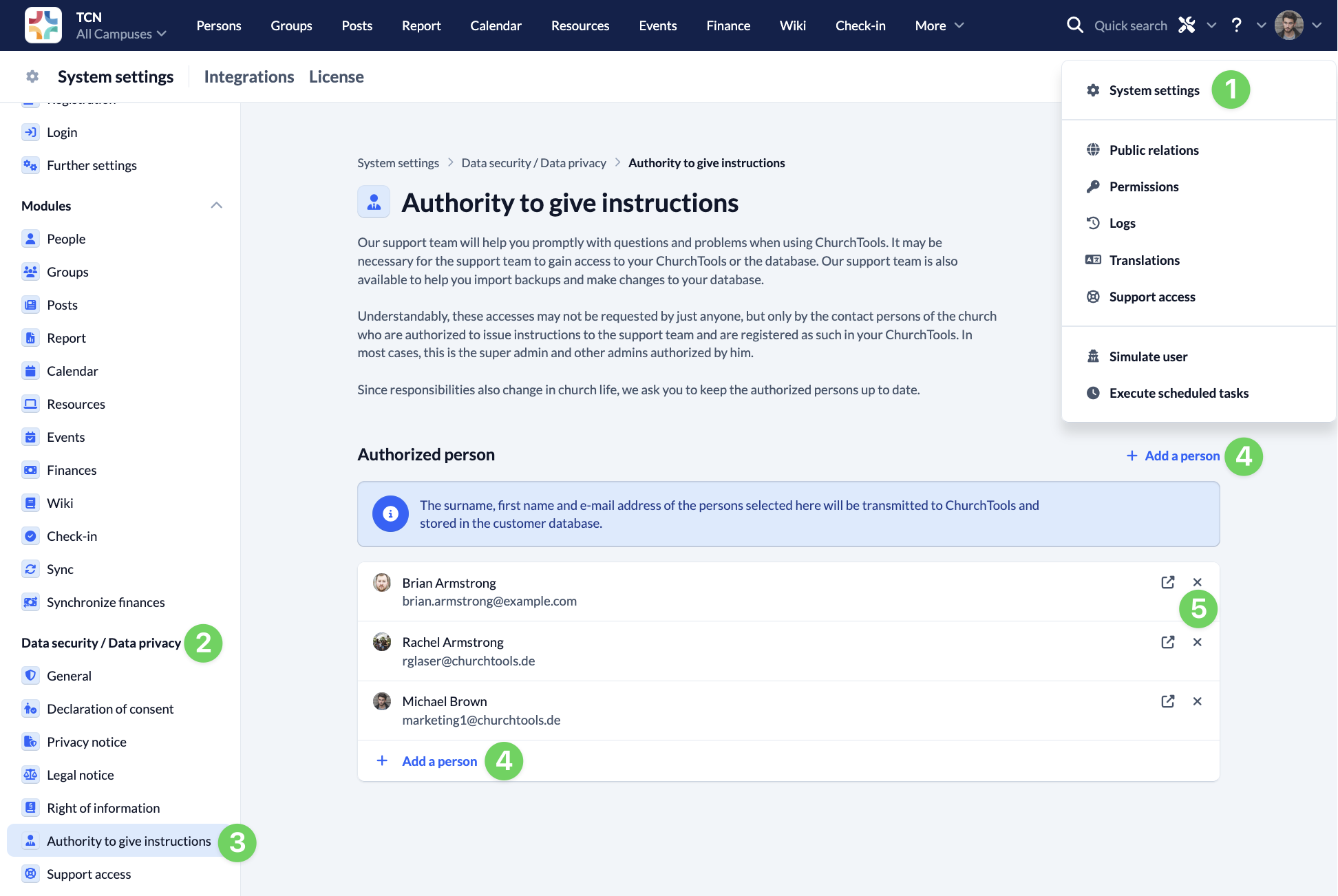
To document who is authorized to issue instructions to us, an admin with super admin rights must enter the persons authorized to issue instructions in ChurchTools. This works as follows:
Go to System settings (1) via the Manage menu in the top right-hand corner and select Authority to give instructions (3) under Data security / Data privacy (2). All current authorized persons are displayed here. Use + Add a person (4) to add further authorized persons. If a person is no longer authorized to issue instructions, remove them by clicking on the x (5) at the end of the line. The last person with authority to issue instructions cannot be removed from the list, as at least one person with authority to issue instructions must always be named.
If you have entered a person here, the surname, first name and e-mail address of the account will be transmitted to us, stored in our customer database and assigned to your congregation.
Keep authorized persons up to date #
Responsibilities also change in church life. Therefore, make sure that you also update the list of authorized persons when responsibilities change.