


To organise how people in your church get together and work together, you can create groups in ChurchTools.
To do this, navigate to the Groups module (1) and click on + Create group (2).

Then fill in all the information about your new group:
- (1) Title of the group
- (2) What type of group does the group belong to?
- (3) Which campus does the group belong to (optional)?
- (4) To which category does the group belong (optional)?
- (5) Should the group be assigned to a parent group (optional)? The campus of the parent group will be displayed. This makes it easier for you to select if you have parent groups with the same title in multiple campuses.
- (6) For whom should the group be visible (optional)?
- (7) What status should the group have?
- (8) What role should be automatically assigned to you when creating the group (optional)?
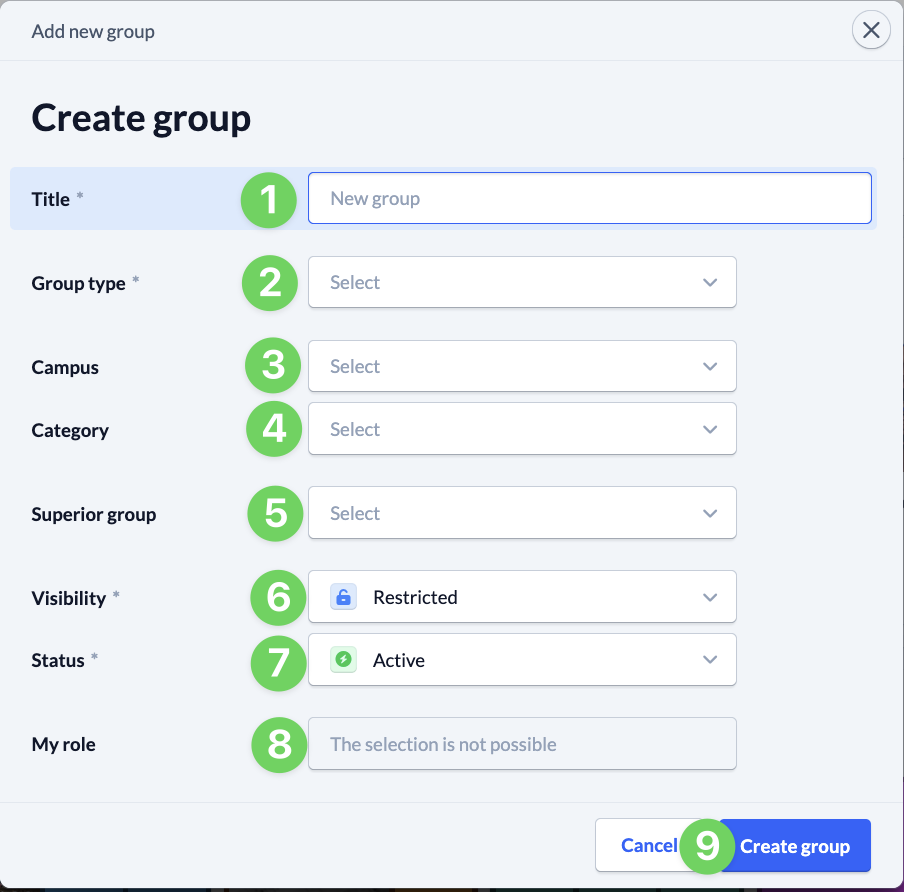
Once you have entered everything, save (8) your new group.