


Do you currently have a ChurchTools trial system? And you want to publish your church profile before you purchase a license?
Then you’ve come to the right place. Have your ChurchTools verified by us in advance. This way, your church profile can be published in the ChurchTools Finder as early as possible.
You don’t have your own ChurchTools system, but you have found your public church profile in the Finder? And now you want to manage this profile yourself?
No problem, you can apply for a free ChurchTools system to manage your public Finder profile. You can find all the information here.
Our goal is to offer our users a reliable and secure platform. That’s why we check that there is a real church behind every Finder profile and that this church wants to be represented by ChurchTools.
To this end, we have introduced the verification process, which you will be guided through directly in your ChurchTools.
1. Request verification #
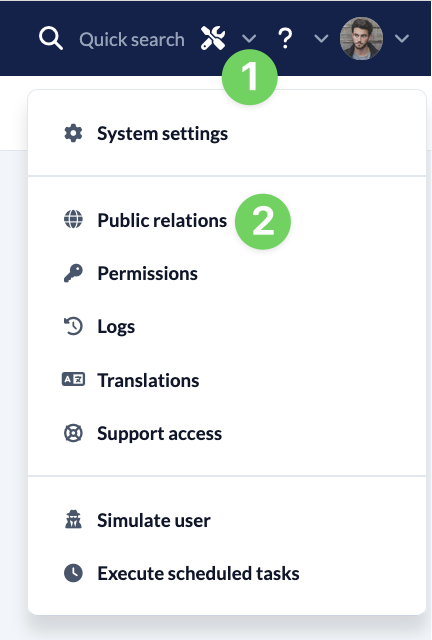
Use the Manage menu(1) in the blue menu bar to call up Public Relations (2). Here you will find the Verify and publish button (4) in your community profile (3). Click on it to start the process.

To complete the verification process, we need your permission to share your name and email address with those responsible in your community. By activating the checkbox during the verification process, you give us your permission to do so.
By clicking on the Request verification button, we will receive an automatic request from your ChurchTools.
2. Confirmation from your church #
We will then inform those responsible for your church via their official e-mail that you would like to represent the church with a self-managed public profile in ChurchTools in the Finder and ask for their confirmation that this is what you want.
2.1 We get an OK #
If the people responsible for your community agree, we will verify the publication of your community profile and publish your community profile in the Finder.
2.2 We do not get an OK #
If those responsible do not agree, we will block the Verify and publish option for your ChurchTools and the profile will not be published.
3. Confirmation of the verification #
As soon as we have received a response from those responsible, we will notify you at your e-mail address whether we have verified the publication of your community profile or not.