


The Home page is your personal ChurchTools summary. You can access it by clicking on your church name at the top left.
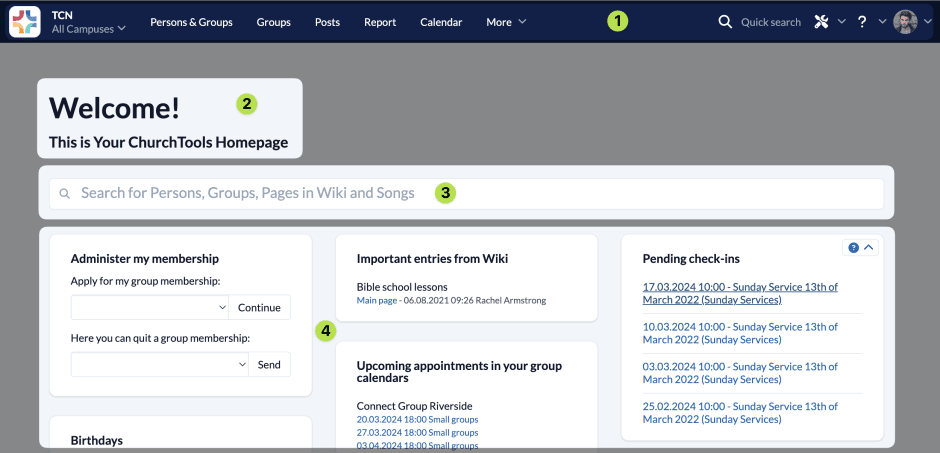
(1) Blue menu bar #
The menu bar at the top of the screen always remains the same and you will always see it, no matter where you are in ChurchTools.
We have compiled a list of the functions in the menu bar for you in the article on the blue menu bar.
(2) Welcome #
You can personalize the welcome message on the Home page so that it is perfect for your congregation. You can find this function in the System settings.
(3) Search #
On the Home page itself, you will find a large search field that you can use to quickly navigate to where you want to go.
(4) Widgets #
Current and important information is also clearly displayed in various widgets, giving you a good overview of what is going on in your congregation and what your upcoming tasks are. Your ChurchTools offers you widgets for birthdays and weddings, upcoming appointments, current posts, outstanding requests to your ministry group, upcoming roles, group management and staffing for upcoming events, absences of your employees, news in ChurchTools, important entries in the wiki and much more.
Exactly what information is displayed here depends on what you see and do in the individual modules (i.e. your permissions and security levels) and what your congregation’s administration team has set for your ChurchTools.
To customize your Home page, you can move the widgets to different positions on the page.
Move widgets #
The widgets on the Home page are arranged in three columns. To Move click on the widget with the mouse, hold it and drag it to the column in which you want it to appear. It is automatically sorted at the bottom of the column. Then drag it to the position you want.
Absences #
This lists the absences of your employees over the next 14 days so that you are aware of when someone is not available.
Current posts #
The latest posts that are visible to you are clearly displayed here and you can quickly access all posts. This widget keeps you up to date on what’s going on in your congregation.
Current bookings #
If you are responsible for room bookings, you will be informed about current bookings here.
Current event staff #
This widget informs you about the staffing of the next upcoming events.
Upcoming dates from group calendars #
The next dates for your groups are displayed here.
Tasks in persons #
The widget informs you when something needs to be done regarding a person in your area of responsibility.
ChurchTools News #
Your direct link to the ChurchTools blog, where you can read about the latest news and much more about ChurchTools.
Facts from the last few tags #
Here you can see the latest facts about your events at a glance.
Birthdays and wedding anniversaries #
In addition to the current and future birthdays, the wedding anniversaries are also displayed here every 5 years based on the wedding dates stored.
Links #
Here you will find links that will take you quickly to internal or external ChurchTools content.
Manage my groups #
Group leaders can specify that their group is an “open group”. You sign up for these open groups directly via this widget, e.g. for a men’s breakfast, a home group or a seminar. You are then either signed up directly or the group leader is informed of your registration, depending on what the leader has stored in the settings.
Open check-ins #
You can use this widget to edit the last meeting of your group directly.
Open service requests #
Here you can confirm or reject your service requests directly or swap the roles.
Open room occupancy requests #
If you are responsible for room bookings, you will be informed about current requests here.
Public profile #
Here you can see the current status of your community profile and any location profiles at a glance.
Important entries from Wiki #
Current changes in the documents are displayed to you as the responsible employee.